DTRAC
DTRAC Builder is the starting point for documentation about the builder and its agents. It separates the workspaces used to author research and collection settings from the execution roles that support that work. This is a guide to the current code structure, not a complete installation or operations manual or a claim of deployment readiness.
How Builder turns a request into an app
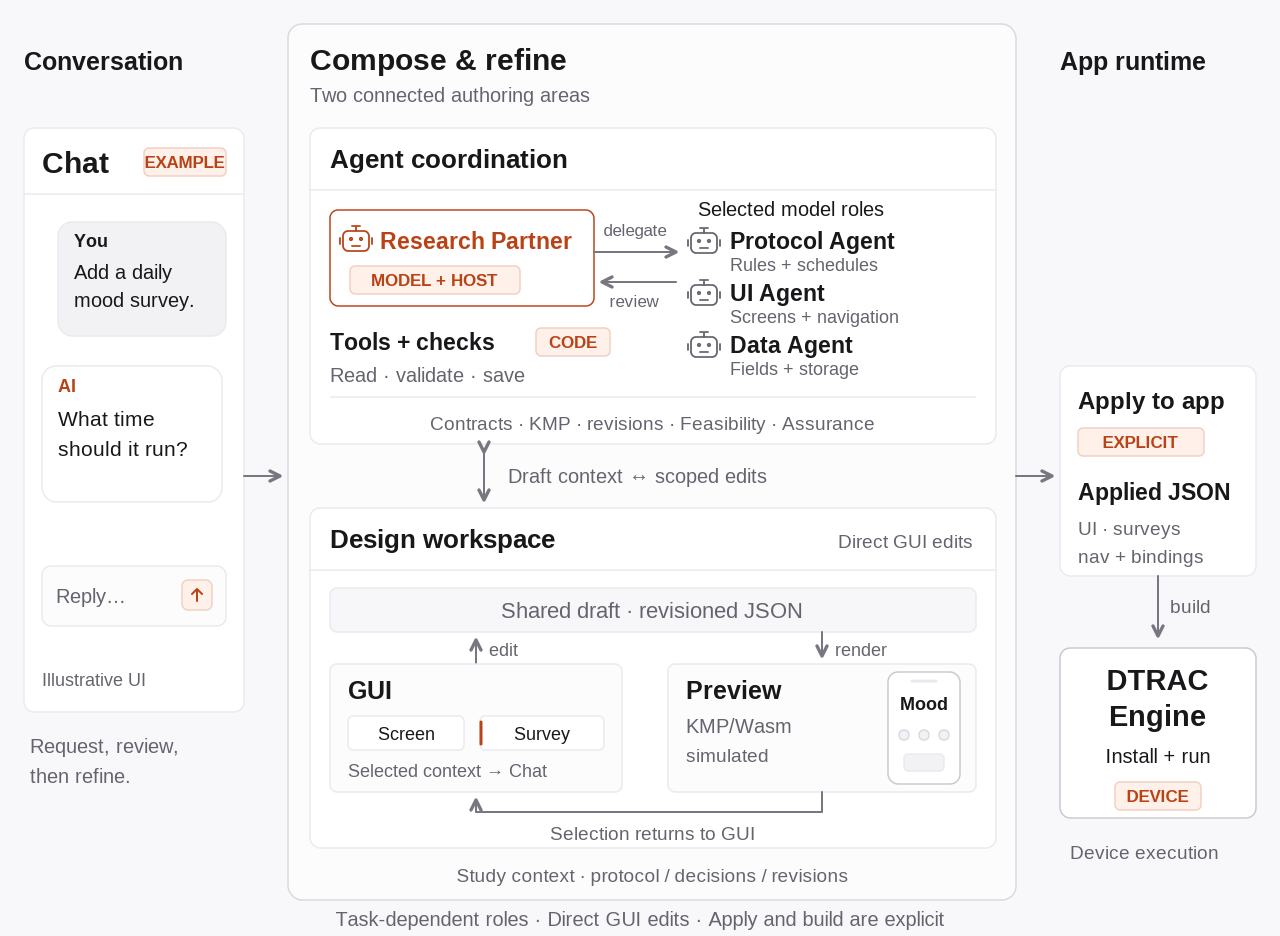
Read the diagram
Chat and two peer authoring areas. The small Chat, GUI and Preview use a hypothetical daily mood-survey example, not a real transcript or exact product screenshot. Chat carries requests, feedback and returned AI replies. Agent coordination and Design workspace share one Compose & refine stage; Agent coordination sits above Design workspace, with equal-level headings and a two-way scoped connection. They are peer areas, not successive steps. Scoped canvas calls exchange draft context and proposed edits, without implying that every research Chat request changes the canvas or that both areas always execute simultaneously. GUI can edit directly. The main reading direction continues through explicit Apply to app, JSON and build/install to Engine.
Chat, GUI and Preview form one design workspace. GUI edits and scoped canvas AI proposals use the same versioned draft. KMP/Wasm Preview renders its JSON; selecting a preview element targets the GUI editor, and the GUI can send that selection to Chat. The researcher reviews, gives feedback or edits directly, then previews again. Preview screen/survey interaction uses simulated state; it does not rewrite design JSON or participant data. Drag/drop changes are handled by the surrounding GUI editor. Explicit Apply to app validates and writes app assets before a separate build/install. General research Chat uses study-authoring tools, so not every message edits the canvas. Workspace source evidence (opens in a new tab).
Read the agent connections. Research Partner combines a model-assisted workflow with host orchestration. Delegation and review arrows show selected role calls and typed results returned to that workflow. Host tools execute synchronously and return observations used by the next model step. Shared context is revisioned application state. Data Agent is the compact diagram label for Data Collection Agent; the direct design/canvas route can bypass specialist review.
Research Partner routes by task. Current requests, source text, the Living Study Protocol and revisioned decisions provide context. Study edits can use a model/tool loop; proposal tasks select domain reviewers; canvas edits can call UI composition directly. These paths do not invoke every role for every request.
Protocol, UI and Data Collection agents make separate role-prompt model calls when selected. They share a base revision and exchange owned patches, constraints, questions and evidence. A lead review precedes peer reviews, with bounded reconciliation. Roles may use the same model. The host orchestrator is code; legacy expert names do not add autonomous agents.
Host tools control changes. Study authoring prepares, validates, atomically saves and reads back a complete amendment. Design generation uses component, action and binding contracts, JSON candidates and KMP render checks. Canvas changes remain drafts until app apply. Feasibility and Assurance are code checks; optional persona wording cannot increase a capability verdict.
Host checks summarize safeguards along each path. It is not one extra model stage. Feasibility uses supported, generatable, constrained or unsupported; Assurance uses passed, warning or blocked, with build initially not_run. Missing research decisions stay questions, and saving settings does not complete researcher review.
Implementation limits and optional routes. The study-authoring loop allows up to 16 model/tool steps and cannot generate screens. Selected domain coordination uses a lead, peers and bounded reconciliation, with up to six calls on the reviewed path; cached or conservative fallback results are possible. Host tools reject stale or partial amendments and preserve later edits during selective undo. The selectable General Agent shares authoring tools; LangGraph is optional, with legacy as the default dispatcher.
Artifacts and runtime are separate. Saved study configuration feeds generation. Applied screen/navigation/survey JSON and runtime bindings become build inputs. Explicit Android build and install actions hand the app to DTRAC Engine. Preview does not verify device execution. View implementation evidence (opens in a new tab).
Research Partner routes each task through the current study state, selected model roles and validated host tools. Research edits, domain reviews and canvas composition use different paths. Feasibility and Assurance are checks around those paths; a design preview, applying it to the app and building Android artifacts remain separate steps.
This diagram reflects the source reviewed on October 13, 2026. Expand Read the diagram for role boundaries and implementation evidence; the earlier documentation baseline below is preserved.
How the three products relate
| Product | Documentation scope |
|---|---|
| DTRAC Builder | Research app configuration and builder/agent structure |
| DTRAC Engine | Conditions, data, and development of the collection app on participant devices |
| DTRAC SDK | Internal Alpha for Android hosts and remaining work before public distribution |
The Engine documentation explains participant-device runtime behavior. The SDK documentation separates reusable modules from remaining integration work; it does not describe a released unified SDK.
Where to start
- Configure with Builder: read Builder structure & workspaces for the boundaries between study settings, collection configuration, and design.
- Run and collect with Engine: continue to Environment & study setup for participant-device requirements, then explore permissions and data collection.
See Agents & execution roles for the roles that support authoring.
Screen components
Build study screens by combining layout, content, inputs and actions. Find a component, check when to use it, then explore its KMP preview and JSON example.
Browse all 45 components using category cards and search. Each detail guide explains support scope and AI authoring conditions.
Documentation baseline
This guide reflects the September 17, 2026 working tree. The default renderer entry point connects main.tsx to StudioShell. Agent classification follows agentTaxonomy.mjs. The existence of older stage-based screens or files does not establish that they are the current default UI.
New guides and integration examples can be added to this product after their behavior and execution conditions have been checked. Whether a project configuration produces a deployable Android app, and what validation an external study requires, need separate verification.
Architecture reference
Refer to DTRAC architecture — Assurance tab alongside the builder and agent structure. This link opens the external architecture reference with the Assurance tab selected.
The reference site currently requires ChatGPT sign-in.